
STOQRA
- B2B operations platform
- Procurement · Inventory · Workforce
From supplier datato everydayoperations.
Materials / Orders / People
Stoqra connects supplier catalogs, internal materials, stock, procurement, material movement, tasks and workforce planning in one operational system.
Available to buy or rent, with cloud or local deployment. Pricing tailored to your needs.
Contact me today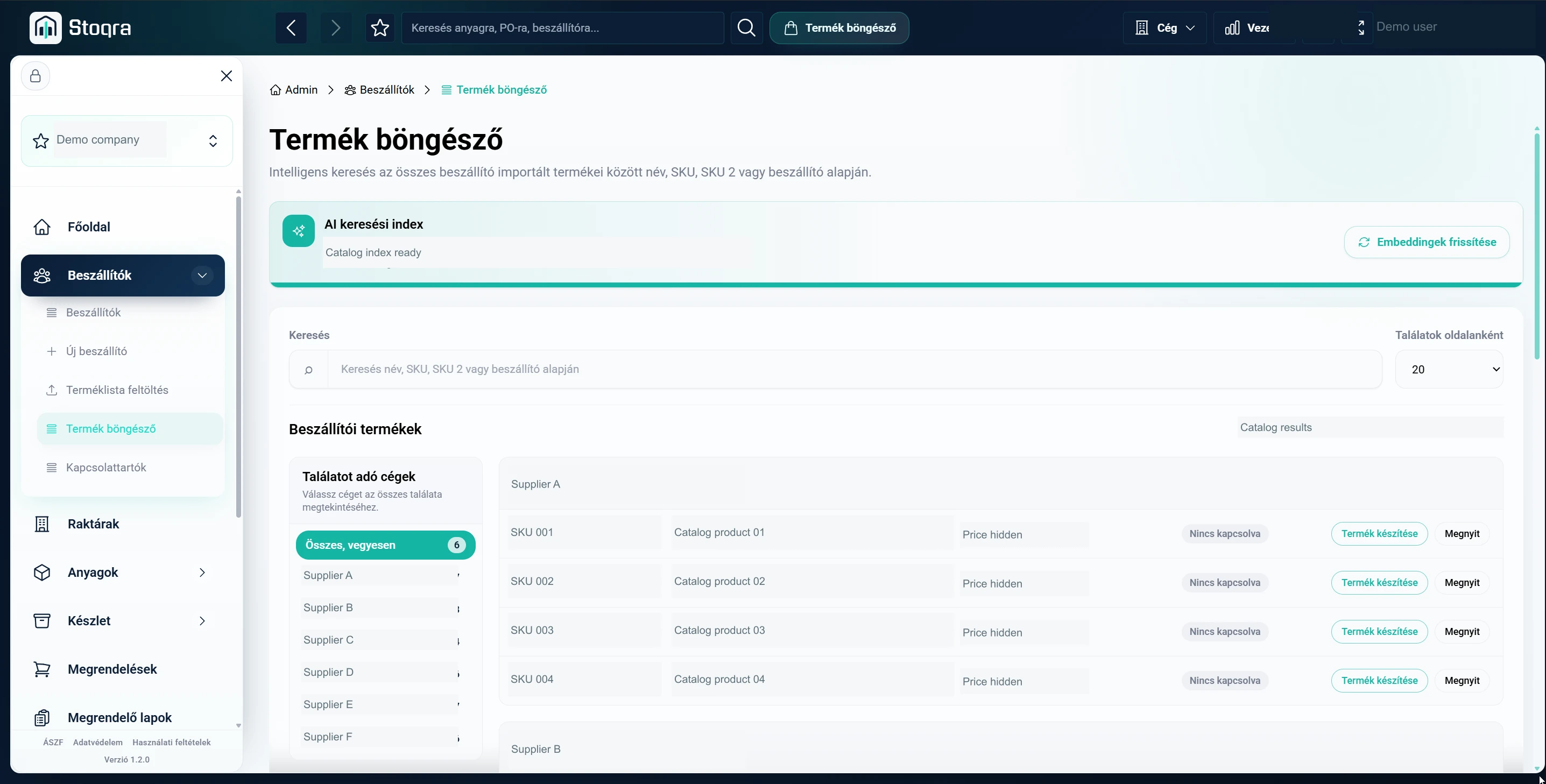
Scroll to explore / Open image for full detail ↗
Application screenshots / Identifying and commercial data anonymized
- The problem
- Supplier lists, stock, purchasing and team coordination scattered across spreadsheets, emails and separate tools.
- The thinking
- Give each material a shared identity, then connect the decisions that depend on it.
- The solution
- An operational chain that carries information from supplier data to purchasing, internal use and workforce planning.
Stoqra / Purchase & rental
Your system. Your choice of deployment.
Stoqra is available to buy or rent, with both cloud and local deployment options.
With local deployment, all your data is physically stored on your own infrastructure, and the system can be placed behind a VPN.
Pricing depends on your requirements. Contact me today for a tailored quote.
Contact me today01 / Supplier data
Thousands of supplier products. One structured starting point.
Complete supplier catalogs can be imported from Excel, including product names, prices, images, SKUs and identifying data. Catalogs can then be refreshed as supplier information changes.
Where a supplier provides a suitable external endpoint, an integration can retrieve product and price data automatically at defined intervals.
Supplier catalog
Excel import / Scheduled sync where supportedStructured supplier products
02 / Material model
Different supplier codes. The same real-world material.
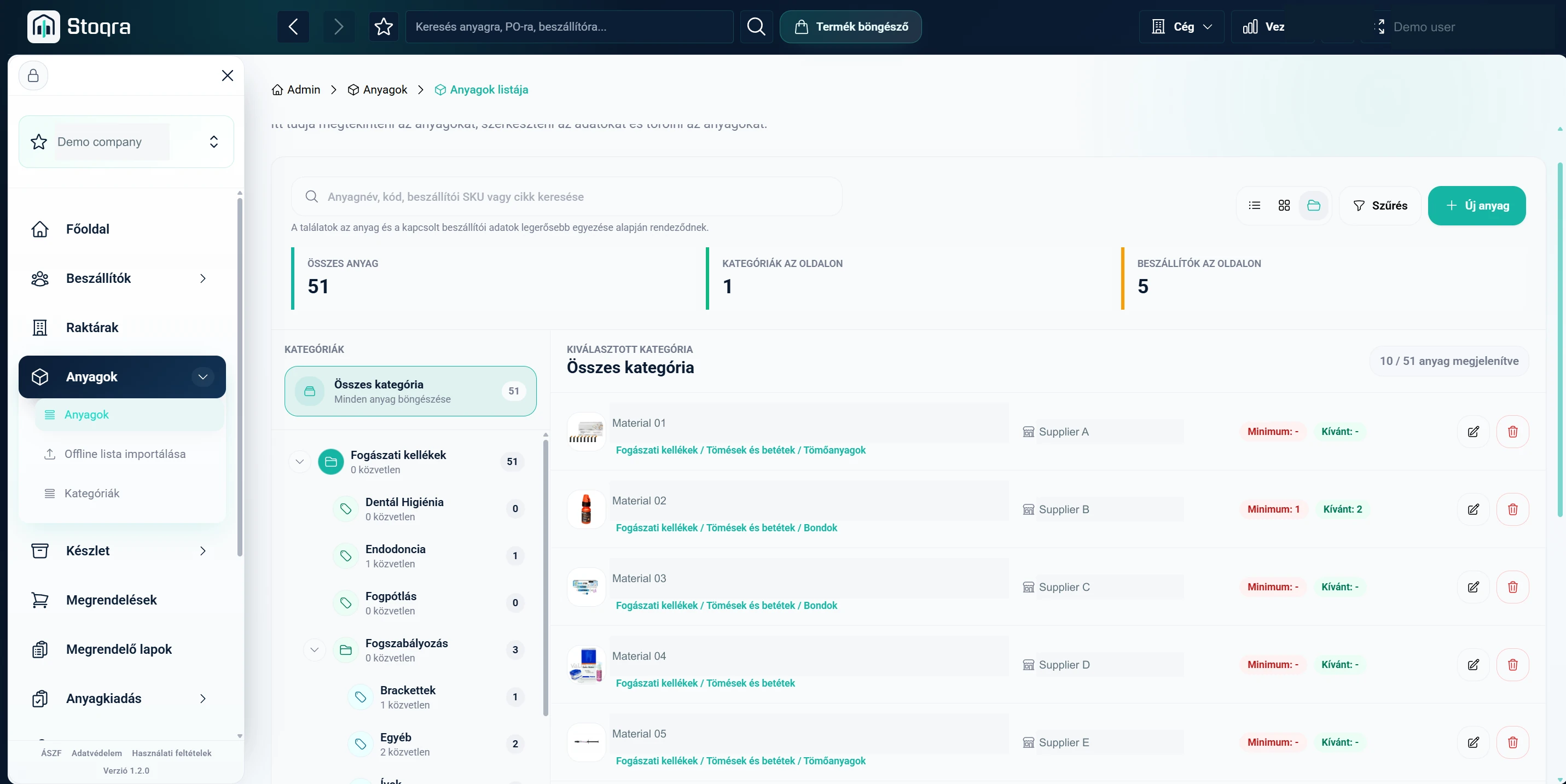
The same physical product may have different names and identifiers across suppliers. Those catalog entries cannot simply become inventory data.
Stoqra separates supplier products from internal materials. Several supplier articles connect to one normalized material used consistently for stock, purchasing and consumption.
Internal material
Scroll to explore / Open image for full detail ↗
03 / AI matching
Finding the same product shouldn’t be manual work.
AI-assisted search and similarity matching help identify identical or closely related products across large catalogs, even when names and supplier identifiers differ.
The system helps users find a relationship. Users remain in control of the final connection to an internal material.
04 / Onboarding
Start with what the company already knows.
Existing material lists can be imported from Excel or JSON. An interactive matching workflow connects them to supplier products, reducing repetitive setup.
Onboarding service packages can also support supplier-data setup, initial configuration and team training.
- 01Existing company data / Excel or JSON
- 02Import & interactive matching
- 03Internal materials / Connected supplier products
05 / Procurement model
One material. Multiple ways to buy it.
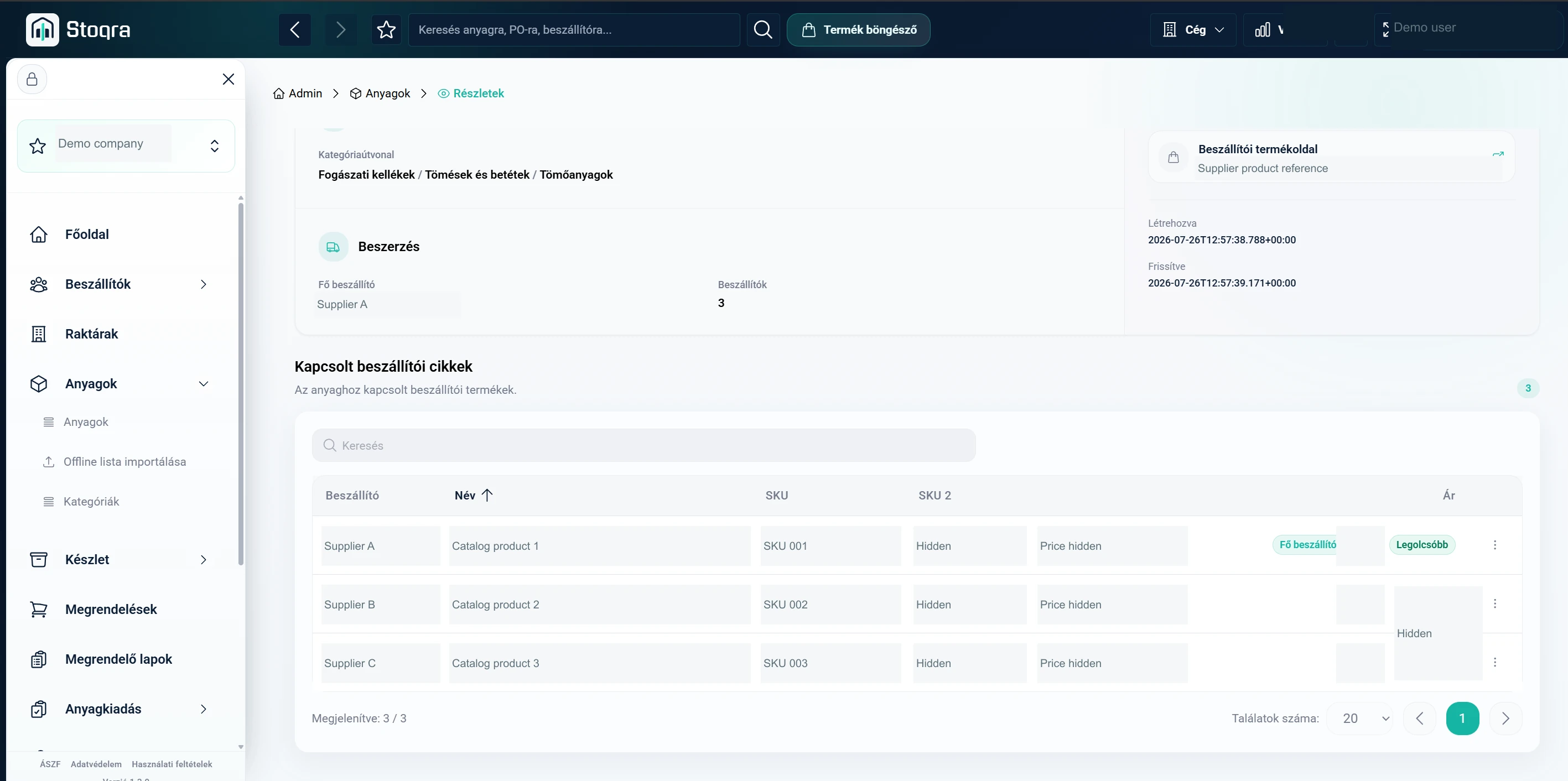
Connected supplier articles let users compare prices and choose a preferred supplier for future purchasing.
Purchasing units and usage units are separate. Conversion rules belong to each supplier relationship, so different packaging formats can feed the same stock record.
A two-piece supplier package is tracked as two individual pieces. Conversion is defined per supplier relationship.
Scroll to explore / Open image for full detail ↗
System map / Two connected operational branches
One operational chain. Fewer disconnected decisions.
Materials & procurement
- Suppliers / Excel or supported API
- Supplier products
- AI-assisted matching
- Internal materials
- Inventory + Supplier choice & prices
- Replenishment
- Order sheet
- Supplier orders
- Receiving → Inventory
- Internal issue
- Employee / Location stock
People & planning
- Employees
- Tasks / Everyday coordination
- Availability / Vacations / Roles
- AI-assisted scheduling
- Management review
- Monthly plan
Employees create material demand and define workforce constraints.
06 / Inventory
Stock levels that lead to action.
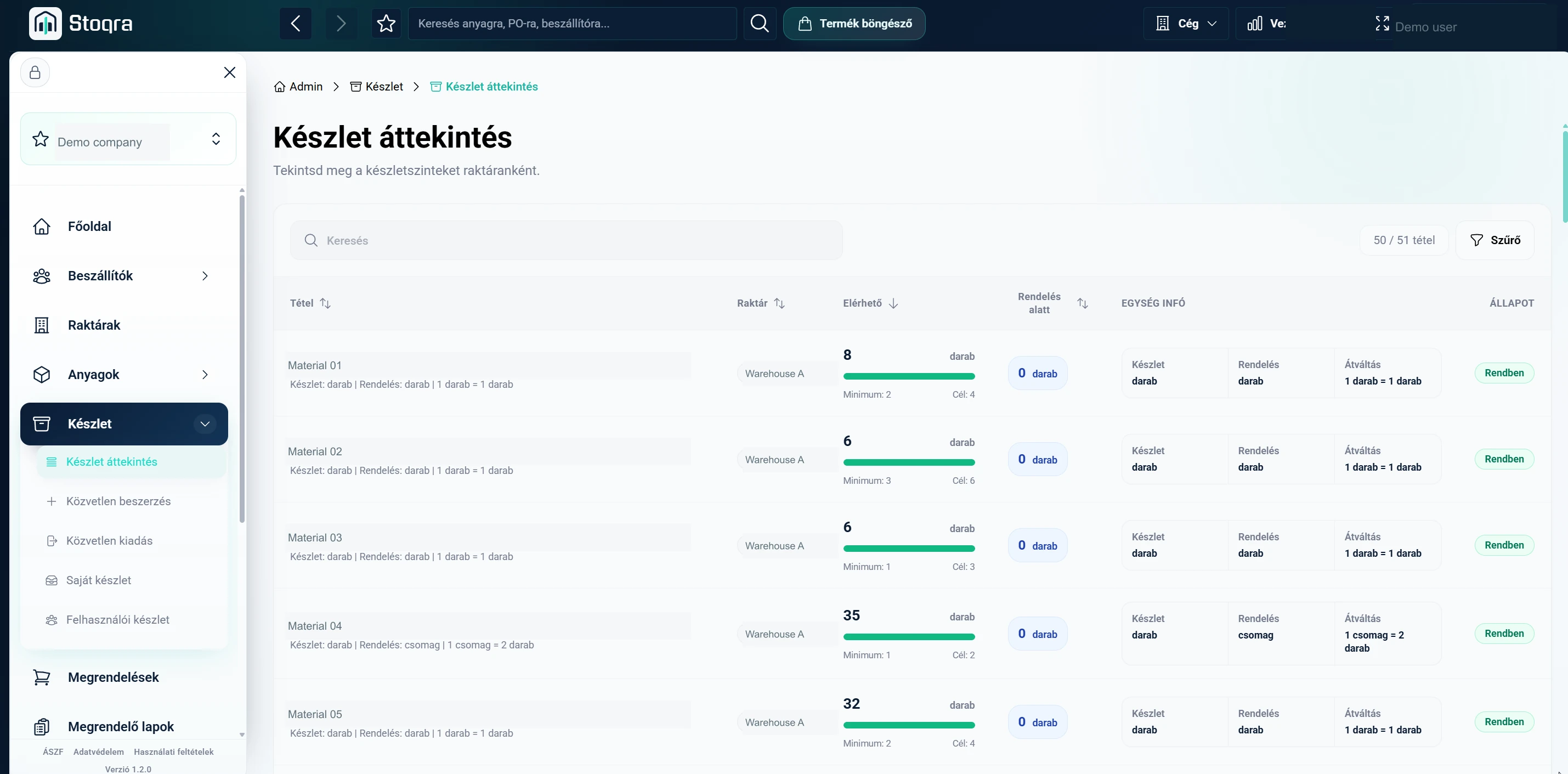
Minimum and target stock levels give each material a replenishment rule. Current quantities are tracked per warehouse, with shortages visible before the next purchase.
Stock can also belong to an employee or an internal location. A pack of wipes issued to the kitchen becomes stock at that destination.
Scroll to explore / Open image for full detail ↗
07 / Replenishment
Don’t wait for zero. Plan before the shortage.
Warehouse, employee and location minimums can surface material requirements automatically on an order sheet.
The system prepares the requirements. Authorized users review them and remain responsible for procurement decisions.
- 01Warehouse / Employee / Location minimums
- 02Stock requirement
- 03Order sheet / User review
08 / Procurement
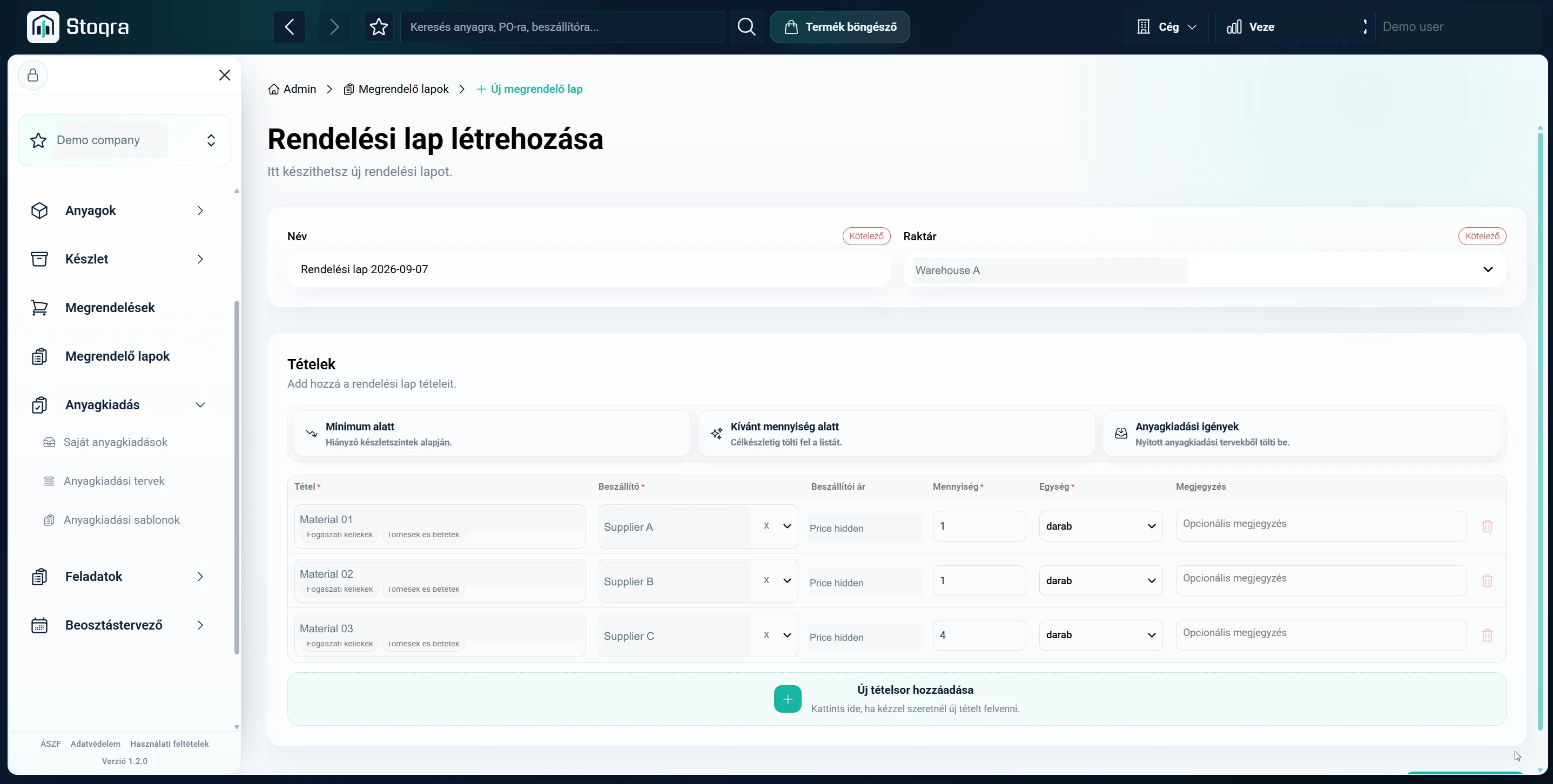
Build one order sheet. Generate the supplier orders.
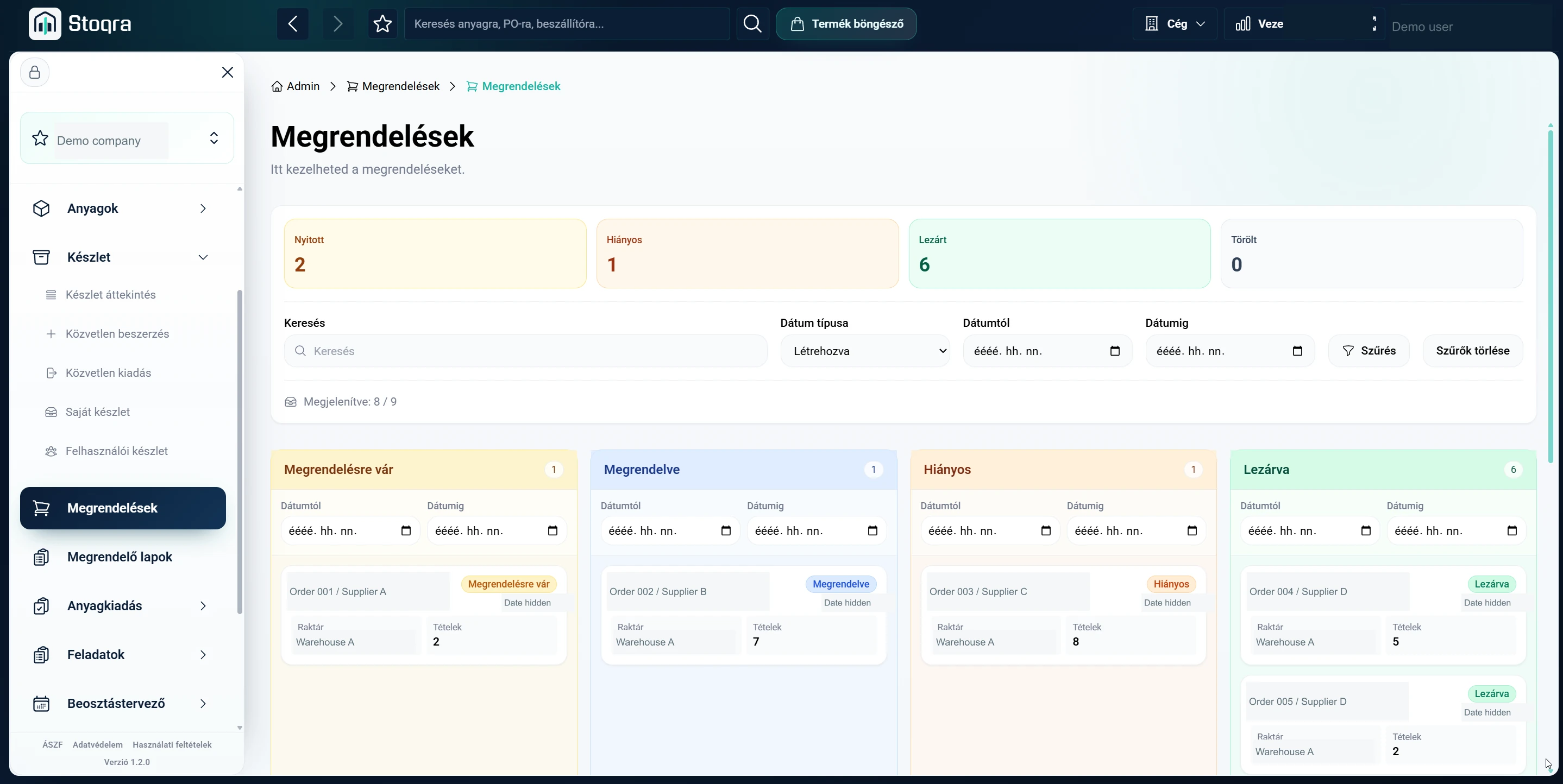
Users review suggested materials, select suppliers, adjust quantities and add lines. Closing the order sheet splits the items into supplier-specific orders.
Each order can generate an Excel file with product names, supplier SKUs and quantities. Authorized users can send orders and mark them as sent; integrations can support automated sending where appropriate.
- 01One reviewed order sheet
- 02Split by supplier / A · B · C
- 03Supplier orders / Excel files
- 04Authorized sending / Integration where configured
Scroll to explore / Open image for full detail ↗
Scroll to explore / Open image for full detail ↗
09 / Receiving
From purchase order back into stock.
Arriving orders can be received from the expected-item list, either by selecting items manually or using barcode scanning.
Stored material barcodes help identify physical products quickly. Receiving brings the purchase back into the warehouse stock record.
- 01Supplier delivery
- 02Expected items / Manual select or barcode scan
- 03Warehouse stock
10 / Material movement
Inventory movement with responsibility attached.
An issue list identifies the receiving employee or location. The recipient approves it before an authorized warehouse user can physically release the materials.
A request alone does not remove stock. Approval and release connect each movement to the people responsible for it.
- 01Issue request
- 02Recipient approval
- 03Authorized warehouse release
- 04Employee or location stock
11 / Tasks
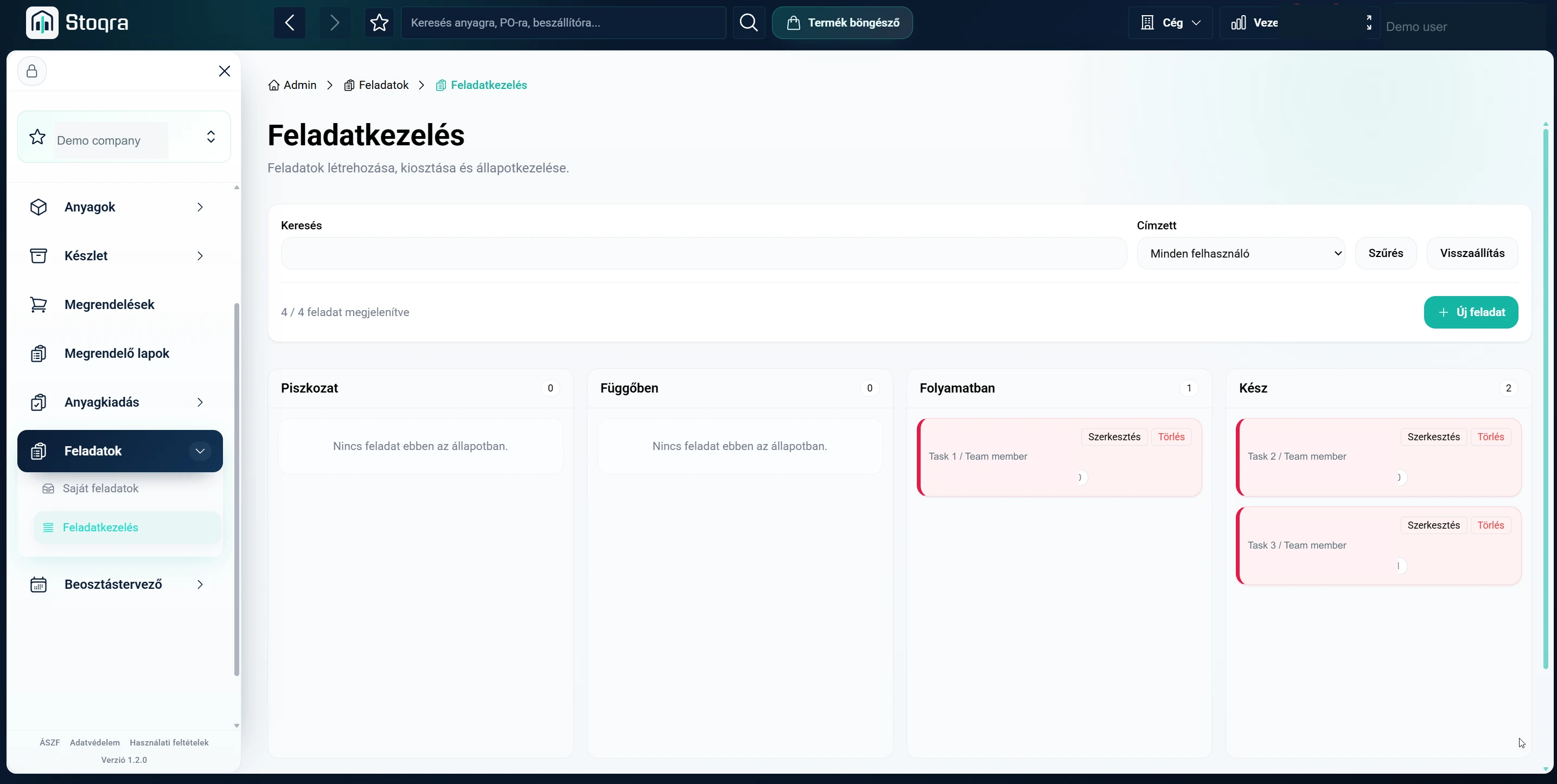
Less work hidden inside email threads.
Managers can create, assign and track everyday tasks inside the platform. Teams share a view of what is open, in progress or completed.
Operational tasks live alongside the processes they relate to, keeping internal coordination close to the work.
Scroll to explore / Open image for full detail ↗
12 / Workforce planning
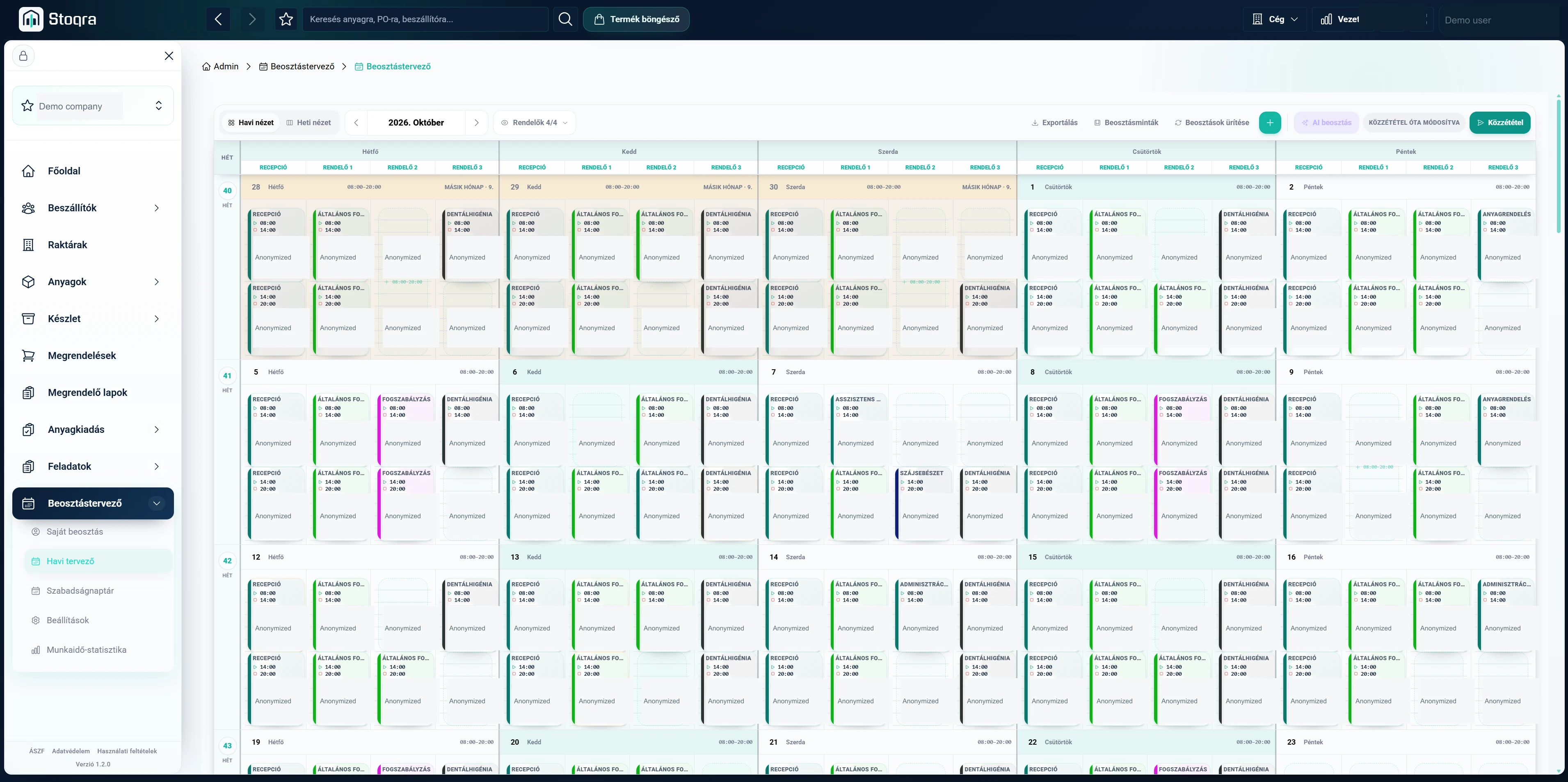
A schedule is more than filling empty cells.
Reusable shift templates define required roles and staffing levels. Employees can hold several roles, with preferences for the work they perform.
Availability, vacations and recurring commitments become planning constraints. Someone who cannot work Wednesdays should not depend on a manager remembering that every month.
- Staffing levels & role coverage
- Vacations & recurring availability
- Working patterns & workload distribution
- Morning / afternoon balance
- Preferred roles & coworkers
Scroll to explore / Open image for full detail ↗
13 / AI planning
AI creates the starting point. Managers keep the control.
AI-assisted planning uses availability, vacations, shift templates, staffing requirements and workload rules to generate a starting schedule.
Preferences can include morning and afternoon balance, roles and coworkers. Management reviews the baseline, adjusts it and publishes the final plan.
- 01Availability / Vacations / Roles
- 02AI-assisted starting schedule
- 03Management review & adjustment
- 04Published monthly plan
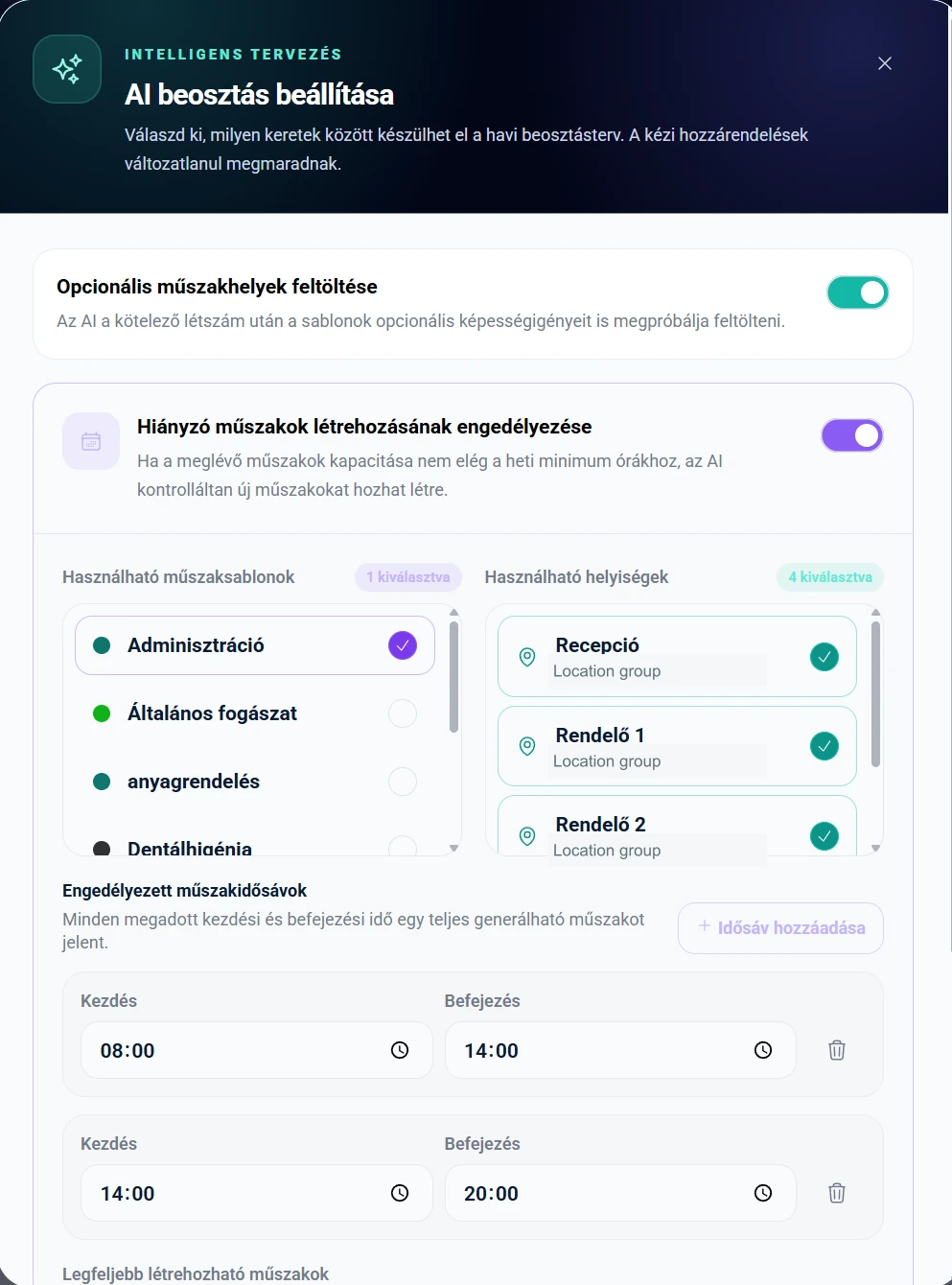
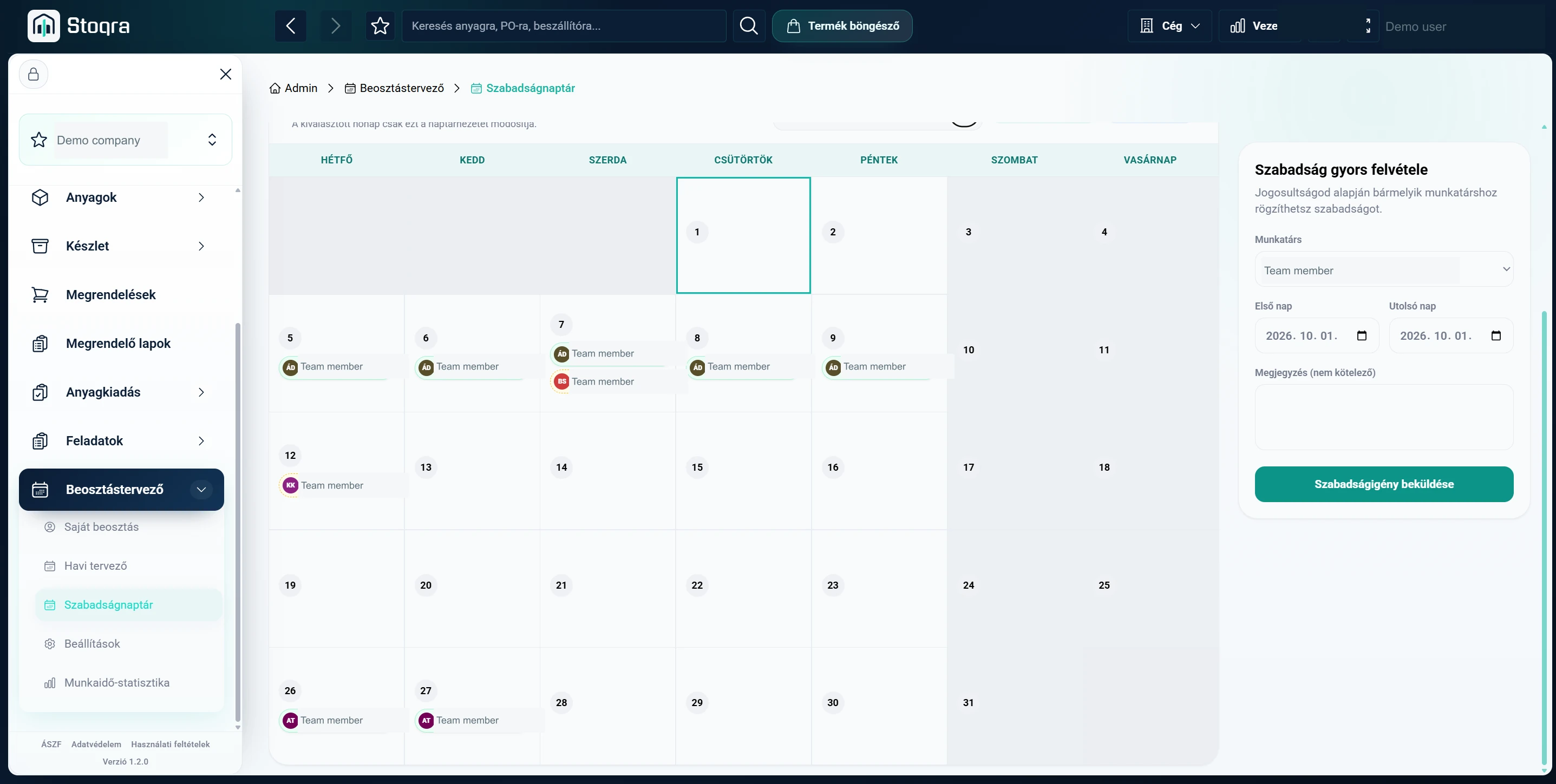
Scroll to explore / Open image for full detail ↗
14 / Mobile
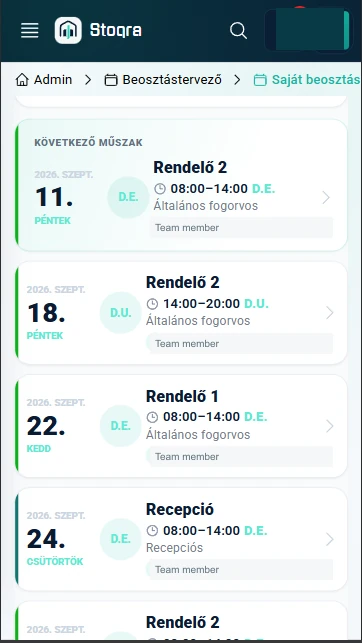
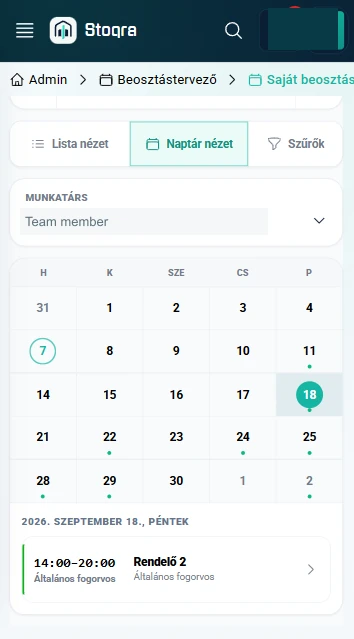
The plan shouldn’t only work at a desk.
Employees can check their own shifts in a compact mobile experience. List and calendar views focus on upcoming work without the complexity of the full administrative planner.
15 / Access control
Built for organizations, not individual accounts.
Companies create organizational accounts and add employees. Detailed roles and permissions align warehouse, procurement, administration and workforce access with each person’s responsibilities.
Employees & responsibilities
Configured roles & permissions
Warehouse / Procurement / Administration / WorkforceThe product principle
Connect the process. Not just the screens.
Supplier data informs materials. Materials inform stock. Stock informs purchasing. Orders return to inventory. Workforce rules become schedules. Information continues through the next decision.